public class HelloWorld{


     public static void main(String []args){

        Integer a=new Integer(10);
        Integer b=new Integer(20);
        a=b; //Value is copied

        a=40;

        System.out.println("a="+a+" b="+b);


         class Numberr
        {
            private Integer value;

            Numberr(Integer value)
            {
              this.value=value;
            }

             public void setValue(Integer value)
            {
              this.value=value;
            }

            public Integer getValue()
            {
                return value;
            }
        }

        Numberr aObj=new Numberr(70);

        Numberr bObj=new Numberr(80);

        aObj=bObj; //Reference is copied

        aObj.setValue(100);

        System.out.println("aObj="+aObj.getValue()+" bObj="+bObj.getValue());
     }
}

A deep creative Elucidations for a problem comes from the depth understanding of the problem. Back bench signifies emancipated minds, only those minds siting at the back bench and meditates deep in to the understanding of the problems will see what has to be seen
May 20, 2018
Copying the value and copying the reference in java
code snippet

Dec 24, 2017
SSH connection from your computer (windows/linux/mac) to android cell phone using putyy
Server(Android phone SSHDroid)
1. Install ssh srever in the android phone (Download SSHDroid app from playstore)
2. Switch on the wifi in the phone
3. Open SSHDroid and click start service

Client (computer putyy)
4. Switch on the wifi in the pc
5. Open putyy and enter the server ip and port number


condition: both the devices connected to same wifi network.
6. Once the connection is established it will prompt for username:root password:admin (default credentials)
7. Now check the working by giving 'date' 'cal' commands

In case if you get 'Network error connection refused'
check the ip and port which should be as given by server username@ipaddress:port
further you can enabling the putyy through firewall (which is optional):
Go to Control Panel\System and Security\Windows Firewall\Allowed apps
>allow another app
>browse
>putty.exe
And now it should work properly.
type 'exit' to terminate the connection
1. Install ssh srever in the android phone (Download SSHDroid app from playstore)
2. Switch on the wifi in the phone
3. Open SSHDroid and click start service

Client (computer putyy)
4. Switch on the wifi in the pc
5. Open putyy and enter the server ip and port number


condition: both the devices connected to same wifi network.
6. Once the connection is established it will prompt for username:root password:admin (default credentials)
7. Now check the working by giving 'date' 'cal' commands

In case if you get 'Network error connection refused'
check the ip and port which should be as given by server username@ipaddress:port
further you can enabling the putyy through firewall (which is optional):
Go to Control Panel\System and Security\Windows Firewall\Allowed apps
>allow another app
>browse
>putty.exe
And now it should work properly.
type 'exit' to terminate the connection
Dec 23, 2017
Accessing the saved wifi password in windows using netsh
Open command prompt by typing 'cmd' in run or win+R and type 'cmd'
> netsh wlan show profiles

>netsh wlan show profiles name=karnatakapg0 key=clear

Now you can see the password being listed in key content
> netsh wlan show profiles

>netsh wlan show profiles name=karnatakapg0 key=clear

Now you can see the password being listed in key content
Sep 21, 2017
Creating a shape file of points from lat long data in postgres sql postgis
MyTable has fields like slno,longitude,latitude
We have to combine longitude,latitude and make another field say 'geom' of type 'public.geometry'
in order to do that first create field 'geom' and execute the following statement.
UPDATE MyTable
SET geom = (SELECT ST_GeomFromText('POINT('||longitude||' '||latitude||')'))
Now that you have PSQL table Open it in QGIS software as vector layerand save as .shape file.
We have to combine longitude,latitude and make another field say 'geom' of type 'public.geometry'
in order to do that first create field 'geom' and execute the following statement.
UPDATE MyTable
SET geom = (SELECT ST_GeomFromText('POINT('||longitude||' '||latitude||')'))
Now that you have PSQL table Open it in QGIS software as vector layerand save as .shape file.
Aug 1, 2017
importing .csv to postgresql
First create the table with column names and sizes in accordance with .csv
Run The SQL:
COPY my_table FROM 'C:\Users\Administrator\Desktop\wrd78.csv' DELIMITER ',' CSV;
OUTPUT Meaage:
ERROR: invalid input syntax for integer: "userName"
CONTEXT: COPY my_table, line 1, column userName: "userName"
********** Error **********
ERROR: invalid input syntax for integer: "userName"
SQL state: 22P02
Context: COPY my_table, line 1, column userName: "userName"
Reason: .csv file has data at ‘userName’row which is character should have been integer.
Solution: Delete the particular row (Mostly it is the column names not data)
Run The SQL Again:
OUTPUT Meaage:
Solution: right click on 'my_table' > sequrity >edit >add> Enter the obj name to select as Everyone
And give all the permission to 'Everyone'
Run The SQL:
Query returned successfully: 14523 rows affected, 161 msec execution time.
Run The SQL:
COPY my_table FROM 'C:\Users\Administrator\Desktop\wrd78.csv' DELIMITER ',' CSV;
OUTPUT Meaage:
ERROR: invalid input syntax for integer: "userName"
CONTEXT: COPY my_table, line 1, column userName: "userName"
********** Error **********
ERROR: invalid input syntax for integer: "userName"
SQL state: 22P02
Context: COPY my_table, line 1, column userName: "userName"
Reason: .csv file has data at ‘userName’row which is character should have been integer.
Solution: Delete the particular row (Mostly it is the column names not data)
Run The SQL Again:
OUTPUT Meaage:
Solution: right click on 'my_table' > sequrity >edit >add> Enter the obj name to select as Everyone
And give all the permission to 'Everyone'
Run The SQL:
Query returned successfully: 14523 rows affected, 161 msec execution time.
Jun 16, 2017
Project facets problem arises when importing maven project into eclipse IDE
why project facets problem arises when importing maven project into eclipse IDE
and how to resolve it.
file>import>maven>existing maven project

rightclick on project>properties>project facets

uncheck java and dynamic web module
rightclick on project>maven>update poject
The best solution is to include plugin in to the POM before importing
Example:
<plugin> <groupId>org.apache.maven.plugins</groupId> <artifactId>maven-compiler-plugin</artifactId> <version>2.1</version> <configuration> <source>1.8</source> <target>1.8</target> </configuration> </plugin>
which makes java 1.8 as facet.
and how to resolve it.
file>import>maven>existing maven project
rightclick on project>properties>project facets
uncheck java and dynamic web module
rightclick on project>maven>update poject
The best solution is to include plugin in to the POM before importing
Example:
<plugin> <groupId>org.apache.maven.plugins</groupId> <artifactId>maven-compiler-plugin</artifactId> <version>2.1</version> <configuration> <source>1.8</source> <target>1.8</target> </configuration> </plugin>
which makes java 1.8 as facet.
Jun 15, 2017
Creating and running the maven as a stand alone application in windows
A.Installing maven
1.Download maven standalone package at https://maven.apache.org/download.cgi
2.unzip on to a prefered location
3.copy the path of the bin say D:\installedSoft\apache-maven-3.3.9-bin\apache-maven-3.3.9\bin
4.create environment variable (USER variable) M2_HOME = D:\installedSoft\apache-maven-3.3.9-bin\apache-maven-3.3.9\bin
5.copy the M2_HOME user variable to the system variable path=%M2_HOME%;
B.Install java JDK
1.create JAVA_HOME and copy to path
C. Check installation and run demo project
1. check the version by executing >> mvn --version in the command line
you should get:
Apache Maven 3.3.9 (bb52d8502b132ec0a5a3f4c09453c07478323dc5; 2015-11-10T22:11:4
7+05:30)
Maven home: D:\installedSoft\apache-maven-3.3.9-bin\apache-maven-3.3.9
Java version: 1.8.0_65, vendor: Oracle Corporation
Java home: C:\Program Files\Java\jdk1.8.0_65\jre
Default locale: en_US, platform encoding: Cp1252
OS name: "windows server 2008", version: "6.0", arch: "amd64", family: "dos"
2.Creating a Project by executing
>> mvn archetype:generate -DgroupId=com.mycompany.app -DartifactId=my-app -DarchetypeArtifactId=maven-archetype-quickstart -DinteractiveMode=false
3.Build the Project
First change directory to the place where project is generated usually
>> CD C:\Users\Administrator\my-app
>> mvn package
Now that the maven has compiled and created the exucutable jar in the new target folder.
4.Run the application
>> java -cp target/my-app-1.0-SNAPSHOT.jar com.mycompany.app.App
OUTPUT:
Hello World!
1.Download maven standalone package at https://maven.apache.org/download.cgi
2.unzip on to a prefered location
3.copy the path of the bin say D:\installedSoft\apache-maven-3.3.9-bin\apache-maven-3.3.9\bin
4.create environment variable (USER variable) M2_HOME = D:\installedSoft\apache-maven-3.3.9-bin\apache-maven-3.3.9\bin
5.copy the M2_HOME user variable to the system variable path=%M2_HOME%;
B.Install java JDK
1.create JAVA_HOME and copy to path
C. Check installation and run demo project
1. check the version by executing >> mvn --version in the command line
you should get:
Apache Maven 3.3.9 (bb52d8502b132ec0a5a3f4c09453c07478323dc5; 2015-11-10T22:11:4
7+05:30)
Maven home: D:\installedSoft\apache-maven-3.3.9-bin\apache-maven-3.3.9
Java version: 1.8.0_65, vendor: Oracle Corporation
Java home: C:\Program Files\Java\jdk1.8.0_65\jre
Default locale: en_US, platform encoding: Cp1252
OS name: "windows server 2008", version: "6.0", arch: "amd64", family: "dos"
2.Creating a Project by executing
>> mvn archetype:generate -DgroupId=com.mycompany.app -DartifactId=my-app -DarchetypeArtifactId=maven-archetype-quickstart -DinteractiveMode=false
3.Build the Project
First change directory to the place where project is generated usually
>> CD C:\Users\Administrator\my-app
>> mvn package
Now that the maven has compiled and created the exucutable jar in the new target folder.
4.Run the application
>> java -cp target/my-app-1.0-SNAPSHOT.jar com.mycompany.app.App
OUTPUT:
Hello World!
Jun 9, 2017
How to setup a HTTPS server
Microsoft Windows [Version 6.0.6002]
Copyright (c) 2006 Microsoft Corporation. All rights reserved.
C:\Users\Administrator>cd %JAVA_HOME%
C:\Program Files\Java\jdk1.8.0_65>cd bin
C:\Program Files\Java\jdk1.8.0_65\bin>keytool -help
Key and Certificate Management Tool
Commands:
-certreq Generates a certificate request
-changealias Changes an entry's alias
-delete Deletes an entry
-exportcert Exports certificate
-genkeypair Generates a key pair
-genseckey Generates a secret key
-gencert Generates certificate from a certificate request
-importcert Imports a certificate or a certificate chain
-importpass Imports a password
-importkeystore Imports one or all entries from another keystore
-keypasswd Changes the key password of an entry
-list Lists entries in a keystore
-printcert Prints the content of a certificate
-printcertreq Prints the content of a certificate request
-printcrl Prints the content of a CRL file
-storepasswd Changes the store password of a keystore
Use "keytool -command_name -help" for usage of command_name
Generating own SSL RSA key using java keytool
C:\Program Files\Java\jdk1.8.0_65\bin>keytool -genkey -alias tomcat -keyalg RSA
Enter keystore password: abc@123
Re-enter new password: abc@123
What is your first and last name?
[Unknown]: raghavendra B A
What is the name of your organizational unit?
[Unknown]: srh
What is the name of your organization?
[Unknown]: srh
What is the name of your City or Locality?
[Unknown]: bangalore
What is the name of your State or Province?
[Unknown]: karnataka
What is the two-letter country code for this unit?
[Unknown]: in
Is CN=raghavendra B A, OU=srh, O=srh, L=bangalore, ST=karnataka, C=in correct?
[no]: yes
Enter key password for
(RETURN if same as keystore password):
Output:
the file will be generated at the location C:\Users\Administrator as .keystore
If you want to specify the location and name during the process then use -keystore filename
example:
C:\Program Files\Java\jdk1.8.0_65\bin>keytool -genkey -alias tomcat -keyalg RSA
-keystore C:\Users\Administrator\Desktop\mykey
Apache Tomcat 8 configuration in server.xml
<Connector port="8443" protocol="org.apache.coyote.http11.Http11NioProtocol"
maxThreads="150" SSLEnabled="true" scheme="https" secure="true"
clientAuth="false" sslProtocol="TLS"
keystoreFile="C:\Users\Administrator\Desktop\SRHSSLKey"
keystorePass="baikadi@99"/>
Used https://www.opinionatedgeek.com/codecs/htmlencoder for encoding the above code snippet
Checking the working of HTTPS
https://localhost:8443/
Copyright (c) 2006 Microsoft Corporation. All rights reserved.
C:\Users\Administrator>cd %JAVA_HOME%
C:\Program Files\Java\jdk1.8.0_65>cd bin
C:\Program Files\Java\jdk1.8.0_65\bin>keytool -help
Key and Certificate Management Tool
Commands:
-certreq Generates a certificate request
-changealias Changes an entry's alias
-delete Deletes an entry
-exportcert Exports certificate
-genkeypair Generates a key pair
-genseckey Generates a secret key
-gencert Generates certificate from a certificate request
-importcert Imports a certificate or a certificate chain
-importpass Imports a password
-importkeystore Imports one or all entries from another keystore
-keypasswd Changes the key password of an entry
-list Lists entries in a keystore
-printcert Prints the content of a certificate
-printcertreq Prints the content of a certificate request
-printcrl Prints the content of a CRL file
-storepasswd Changes the store password of a keystore
Use "keytool -command_name -help" for usage of command_name
Generating own SSL RSA key using java keytool
C:\Program Files\Java\jdk1.8.0_65\bin>keytool -genkey -alias tomcat -keyalg RSA
Enter keystore password: abc@123
Re-enter new password: abc@123
What is your first and last name?
[Unknown]: raghavendra B A
What is the name of your organizational unit?
[Unknown]: srh
What is the name of your organization?
[Unknown]: srh
What is the name of your City or Locality?
[Unknown]: bangalore
What is the name of your State or Province?
[Unknown]: karnataka
What is the two-letter country code for this unit?
[Unknown]: in
Is CN=raghavendra B A, OU=srh, O=srh, L=bangalore, ST=karnataka, C=in correct?
[no]: yes
Enter key password for
(RETURN if same as keystore password):
Output:
the file will be generated at the location C:\Users\Administrator as .keystore
If you want to specify the location and name during the process then use -keystore filename
example:
C:\Program Files\Java\jdk1.8.0_65\bin>keytool -genkey -alias tomcat -keyalg RSA
-keystore C:\Users\Administrator\Desktop\mykey
Apache Tomcat 8 configuration in server.xml
<Connector port="8443" protocol="org.apache.coyote.http11.Http11NioProtocol"
maxThreads="150" SSLEnabled="true" scheme="https" secure="true"
clientAuth="false" sslProtocol="TLS"
keystoreFile="C:\Users\Administrator\Desktop\SRHSSLKey"
keystorePass="baikadi@99"/>
Used https://www.opinionatedgeek.com/codecs/htmlencoder for encoding the above code snippet
Checking the working of HTTPS
https://localhost:8443/
Apr 18, 2017
How to keep multiple instance of tomcat running
There are two ways in which one can make use of a software one by using
1.installer (where some software helps in deploying files in appropriate places and modifying environment variables)
Microsoft Windows application uses MSI (Microsoft software installer)
Red hat based Linux uses YUM utility
Debian based Linux variant say Ubuntu uses APT utility
"But the major problem using installer is, there is no flexibility for the user to change it to suit his or her requirement"
so here comes the second way of using a software
2.Archived
Instead of downloading the installers just down load .zip .tar type software package and unpack it. now you can customize it.
1. Download Tomcat from here & unzip to any location.
2. Go to \Conf folder and take the backup of all the files (It is good practice to have the backup of original files before making any changes)
3. we are going to edit web.xml and change 'listings' param-value 'false' to 'true'.
<servlet>
<servlet-name>default</servlet-name>
<servlet-class>org.apache.catalina.servlets.DefaultServlet</servlet-class>
<init-param>
<param-name>listings</param-name>
<param-value>true</param-value>
</init-param>
</servlet>
4. Edit server.xml if you want to run multiple instances of tomcat simultaneously connecting to different port you can do it by changing 8080 to some other value.
<Connector port="8080" protocol="HTTP/1.1"
connectionTimeout="20000"
redirectPort="8443" />
5. Edit tomcat-users.xml and give the user name password for 'manager-gui' role (uncomment if commented).
<role rolename="manager-gui"/>
<user username="admin" password="admin" roles="manager-gui"/>
6.Add the environmental variable 'JAVA_HOME' for Development of Java based application
or 'JRE_HOME' for just running the application purpose.
My computer - Properties -Advanced system settings - Environment variables
Ex:
variable name: JAVA_HOME
variable value: C:\Program Files\Java\jdk1.8.0_73
7. Now start the tomcat by double clicking on startup.bat
check at http://localhost:8080
8.Now stop the tomcat by double clicking on shutdown.bat
1.installer (where some software helps in deploying files in appropriate places and modifying environment variables)
Microsoft Windows application uses MSI (Microsoft software installer)
Red hat based Linux uses YUM utility
Debian based Linux variant say Ubuntu uses APT utility
"But the major problem using installer is, there is no flexibility for the user to change it to suit his or her requirement"
so here comes the second way of using a software
2.Archived
Instead of downloading the installers just down load .zip .tar type software package and unpack it. now you can customize it.
1. Download Tomcat from here & unzip to any location.
2. Go to \Conf folder and take the backup of all the files (It is good practice to have the backup of original files before making any changes)
3. we are going to edit web.xml and change 'listings' param-value 'false' to 'true'.
<servlet>
<servlet-name>default</servlet-name>
<servlet-class>org.apache.catalina.servlets.DefaultServlet</servlet-class>
<init-param>
<param-name>listings</param-name>
<param-value>true</param-value>
</init-param>
</servlet>
4. Edit server.xml if you want to run multiple instances of tomcat simultaneously connecting to different port you can do it by changing 8080 to some other value.
<Connector port="8080" protocol="HTTP/1.1"
connectionTimeout="20000"
redirectPort="8443" />
<role rolename="manager-gui"/>
<user username="admin" password="admin" roles="manager-gui"/>
or 'JRE_HOME' for just running the application purpose.
My computer - Properties -Advanced system settings - Environment variables
Ex:
variable name: JAVA_HOME
variable value: C:\Program Files\Java\jdk1.8.0_73
7. Now start the tomcat by double clicking on startup.bat
check at http://localhost:8080
8.Now stop the tomcat by double clicking on shutdown.bat
Aug 31, 2016
When AVD exceeds the max specified in your HAXM configuration
Android developers can debug and build .apk and run in real
device without AVD (Android virtual device) emulator. Sometimes it is easier
and convenient to use AVD than searching for the real device! But many people
come across the following error while launching AVD. Hence you will not be able
to run your app. The reason for the issue is insufficient RAM allocated for
HAXM during installation. But now you’re trying to exceed creating AVD emulator
with higher RAM requirement.
The solution no1 is to reduce the emulator requirement which
is the temporary solution or solution number to is reinstalling or changing RAM
size of HAXM.
Problem:
>>
emulator: The memory needed by this AVD exceeds the max
specified in your HAXM configuration.
emulator: AVD RAM
size = 1152 MB
emulator: HAXM max RAM size = 512 MB
emulator: You might want to adjust your AVD RAM size and/or
HAXM configuration to run in fast virt mode.
Cannot set up guest memory 'pc.ram': Invalid argument
Solution1:
Tools > Android > AVD Manager > Your Device >
Show Advanced Settings > Set RAM to preferred size.
Solution2:
In Control Panel >
Programs and Features > Intel Hardware Accelerated Execution Manager >
Change > Set manually > Set to preferred size
>>
 |
| Go to control panel > programs and features >right click on Intel Hardware Accelerated Execution Manager |
 |
| click next |
 |
| click change |
 |
| change the proper limit (This allocates the maximum specified RAM to emulators solving other process) |
HAXM is working and emulator runs in fast virt mode
Aug 30, 2016
How set up the android development environment
Setting up the android development environment in a windows environment is easy.
Download Android SDK from Google.
Download JDK from oracle.
Install the JDK first.
Install the Android studio.


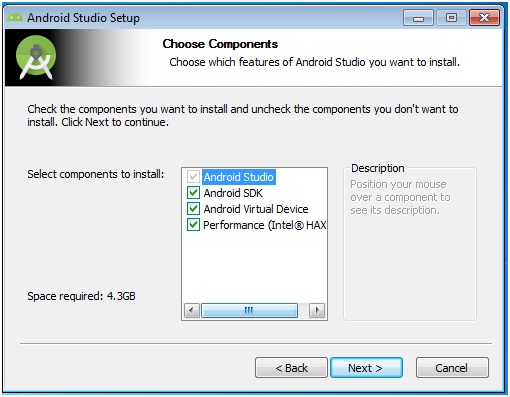


Aug 27, 2016
Developer options in android phone.
Settings > about phone > tap 7 times on build number > now developer option is enabled.
Settings > apps > settings > storage > clear data > now developer option is disabled and hidden.


Settings > apps > settings > storage > clear data > now developer option is disabled and hidden.
 |
| Go to settings |
 |
| slide to about phone option at the end |
 |
| tap seven times on build number |

 |
| Now you have the privilege of developer |
 |
| Now you can see the developer option in the settings |
 |
| Now you can set different options within developer option |
 |
| To disable and hide the option go to apps in the settings |
 |
| go to storage |
 |
| clear all the data, that means you reset the settings |

One of my video on the activating- deactivating developer option in moto g 2, marshmallow
May 18, 2016
How to restore your Sony Vaio laptop to its authentic windows version.
How to restore your Sony Vaio laptop to its authentic windows version?
In my case I am using Sony e series SVE14133CNW laptop
If you have upgraded before the latest one will be recovered.
Step 1: shut down laptop completely
Step 2: press assist button at the top
Step 3: In rescue mode select recover or maintain your system

Step 4: choose the language English

Step 5: choose your key board layout US

Step 6: choose an option trouble shoot

Step 7: In the recovery tool choose the OS

Step 8: select C drive only and keep the files to avoid the deletion of other drives
It takes around 45 minutes to recover.


In my case I am using Sony e series SVE14133CNW laptop
If you have upgraded before the latest one will be recovered.
Step 1: shut down laptop completely
Step 2: press assist button at the top
Step 3: In rescue mode select recover or maintain your system

Step 4: choose the language English

Step 5: choose your key board layout US

Step 6: choose an option trouble shoot

Step 7: In the recovery tool choose the OS

Step 8: select C drive only and keep the files to avoid the deletion of other drives
It takes around 45 minutes to recover.


Jun 22, 2014
Buffer problem
1.There
is a buffer and its size is unknown and the content size which is
present in the buffer is also unknown. The size of the content doubles
every iteration, and buffer gets filled at 73rd iteration. So at what
iteration buffer gets filled 12.5%.
Solutions:
when 2^73 buffer is 100%
 when 2^72 buffer is 50%
 when 2^71 buffer is 25%
 when 2^70 buffer is 12.5%

Solutions:
when 2^73 buffer is 100%
Interview Robosoft Technologies
Preliminary Test
There were three set of question papers like A, B, C. My question paper had the following question.
1.Write a C/C++ program that will read a string of any length into variable S and modify to replace digits into respective alphabets and store into new variable P.
Ex:
Input: bangalore13a
Output: bangalore0nethreea
Sol: Use dynamic memory management, as it is an array better go for calloc();
2. Write a C/C++ program that will read two strings of any length P, S and out puts the string T which will have the string P and the non-repeated characters among P and S.
Ex:
S: Bangalore
P: Mangalore
T: BangaloreM
Technical Interview (c, c++, data structure, other core subjects)
1.Interviewer verified the program once again that I had already wrote for the preliminary and questions upon that.
2.Modifications to the program according to interviewer wish.
3.What are the two types of memory allocation what is the difference between them.
4.What is the difference between malloc() and calloc()
5.Write the syntax of malloc, calloc and realloc
6.Write a statement to reallocate the memory of some existing allocated memory.
7.What is static variable in c and c++.
8.What is the use of static variable and how can we modify it? Write some statements to modify it.
9.What is constructer what are its properties?
10.What is virtual function what is the use of virtual function?
11.Write a class cricket that should include team name and name of 11 players, make use of constructors.
12.Show the implementation of linked list.
13.What is the difference between function over riding function over loading.
14.There is a buffer and its size is unknown and the content size which is present in the buffer is also unknown. The size of the content doubles every iteration, and buffer gets filled at 73rd iteration. So at what iteration buffer gets filled 12.5%.
Solution Link: Buffer problem
15.Reversing the string (in java, C++, or C).
16.Input is the string of any length which contains letter ‘a’ output is the modified sting with the replacement of ‘a’ with successive ‘*’.
Ex:
Input: rajashekara
Output: r*j**shek***r****
H R round
1.Where are you from? what is your father, mother?
2.Questions on the hobbies that I had written on the Resume
(You write blogs when you last updated it? You watch science fiction movies can you name few sci-fi movies? Which are the social networking sites you use? You edit Wikipedia in which are the area you edit give me some example)
3.She asked about my semester marks? (I did not remember)
4.List five recently introduced software or hardware.
5.Your education background
6.Why you want to join robosoft?
7.Why we want to hire you? (I said something the she asked ‘Are those qualities you poses’? I replayed positively.)
8.Were you among the top ten students in your class?
9.What you know about our company?
10.Are you aware of the terms and conditions of our company? Are you willing to join?
Hints from my point of view:
1. Keep smiling like this not always
2. have some initial preparation
3. Be positive be truthful as much as you can.
4. Have an image in your mind as being got selected. Then everything works fine.
5. Never mind if not this company you will have other or you can start your own not joking.
6. Just be grateful to God. Ask nothing, He knows what is best for us.
Thank you.
There were three set of question papers like A, B, C. My question paper had the following question.
1.Write a C/C++ program that will read a string of any length into variable S and modify to replace digits into respective alphabets and store into new variable P.
Ex:
Input: bangalore13a
Output: bangalore0nethreea
Sol: Use dynamic memory management, as it is an array better go for calloc();
2. Write a C/C++ program that will read two strings of any length P, S and out puts the string T which will have the string P and the non-repeated characters among P and S.
Ex:
S: Bangalore
P: Mangalore
T: BangaloreM
Technical Interview (c, c++, data structure, other core subjects)
1.Interviewer verified the program once again that I had already wrote for the preliminary and questions upon that.
2.Modifications to the program according to interviewer wish.
3.What are the two types of memory allocation what is the difference between them.
4.What is the difference between malloc() and calloc()
5.Write the syntax of malloc, calloc and realloc
6.Write a statement to reallocate the memory of some existing allocated memory.
7.What is static variable in c and c++.
8.What is the use of static variable and how can we modify it? Write some statements to modify it.
9.What is constructer what are its properties?
10.What is virtual function what is the use of virtual function?
11.Write a class cricket that should include team name and name of 11 players, make use of constructors.
12.Show the implementation of linked list.
13.What is the difference between function over riding function over loading.
14.There is a buffer and its size is unknown and the content size which is present in the buffer is also unknown. The size of the content doubles every iteration, and buffer gets filled at 73rd iteration. So at what iteration buffer gets filled 12.5%.
Solution Link: Buffer problem
15.Reversing the string (in java, C++, or C).
16.Input is the string of any length which contains letter ‘a’ output is the modified sting with the replacement of ‘a’ with successive ‘*’.
Ex:
Input: rajashekara
Output: r*j**shek***r****
H R round
1.Where are you from? what is your father, mother?
2.Questions on the hobbies that I had written on the Resume
(You write blogs when you last updated it? You watch science fiction movies can you name few sci-fi movies? Which are the social networking sites you use? You edit Wikipedia in which are the area you edit give me some example)
3.She asked about my semester marks? (I did not remember)
4.List five recently introduced software or hardware.
5.Your education background
6.Why you want to join robosoft?
7.Why we want to hire you? (I said something the she asked ‘Are those qualities you poses’? I replayed positively.)
8.Were you among the top ten students in your class?
9.What you know about our company?
10.Are you aware of the terms and conditions of our company? Are you willing to join?
Hints from my point of view:
1. Keep smiling like this not always
2. have some initial preparation
3. Be positive be truthful as much as you can.
4. Have an image in your mind as being got selected. Then everything works fine.
5. Never mind if not this company you will have other or you can start your own not joking.
6. Just be grateful to God. Ask nothing, He knows what is best for us.
Thank you.
Jun 19, 2014
facebook was down!
www.facebook.com and www.m.facebook.com are down right now
The error message is
Sorry, something went wrong.
We're working on getting this fixed as soon as we can.
Go Back

More Details on Today's Outage - Facebook

8:14 am
Thursday, 19 June 2014 (UTC)
Time in Coordinated Universal Time The error message is
Sorry, something went wrong.
We're working on getting this fixed as soon as we can.
Go Back
More Details on Today's Outage - Facebook
Jun 16, 2014
Trigonometric ratios of standard angles
Try not to store in the memory something which is derivable.
I always try that. Trigonometric ratios of standard angle is one among them. It
is very simple if you understand. Let me assume that you’re starting from the
scratch.
sin θ = Opposite / Hypotenuse
cos θ = Adjacent / Hypotenuse
tan θ = Opposite / Adjacent
cosec θ = 1 / sin θ = Hypotenuse / Opposite
sec θ = 1 / cos θ = Hypotenuse / Adjacent
cot θ = 1 / tan θ = Adjacent / Opposite 


Subscribe to:
Posts (Atom)